
Free calculators for game and app developers
Estimate what your game can earn.
Enter your price, units sold and platform fee. See net revenue after every deduction. Every tool shows its formula.
- Formula on every page
- Worked examples
- No sign-up
Game Revenue Calculator
Estimate your net game revenue after discounts, VAT, platform fees & refunds.
*Epic Games Store charges 0% on the first $1M per app per year, then 12%. Estimates only — actual results vary.
Calculators
Pick a tool. Each one shows its formula and a worked example.
How the estimates work
Enter your numbers
Add your price, units sold and platform fee.
Read the estimate
See net revenue after every deduction.
Check the formula
Every tool shows the math behind each number.
Game Revenue Calculator – Revenue Calculator, Earnings, Formula & Guide
Game Revenue Calculator is a useful tool for estimating revenue from video game sales and monetization. It helps developers, publishers, and indie studios understand potential earnings from units sold, in-app purchases, and advertising. This revenue estimator gives creators a realistic look at their net income after platform fees.
The tool takes inputs like game price, units sold, platform commission, and refund rates to generate estimated revenue. It accounts for regional pricing, VAT, discounts, and platform fees. These factors cause actual earnings to vary significantly from estimates.
Users learn how game monetization works and which revenue streams matter most. The earnings calculator helps with financial planning and setting sales goals. It shows the difference between gross revenue and net income. This calculator tool supports smarter decisions about pricing strategy and platform distribution.
Game Revenue Calculator Overview
| Category | Details |
|---|---|
| Calculator Type | Game Revenue Calculator |
| Main Purpose | Estimate video game income after platform fees, refunds, and deductions |
| Revenue Source | Game sales, DLC, In-app purchases, Advertising |
| Main Inputs | Game Price, Units Sold, Platform Fee, Refund Rate |
| Revenue Output | Estimated Gross and Net Revenue |
| Currency | USD (with regional variations) |
| Calculation Type | Multi-platform revenue aggregation with fee deductions |
| Accuracy | Estimate only; varies by platform, region, and pricing strategy |
| Best For | Indie developers, publishers, studios, game marketers |
What Is Game Revenue Calculator?
A Game Revenue Calculator is a digital tool that estimates how much money a game can earn from sales and monetization across different platforms. It combines unit sales, pricing, and platform fees into a single earnings estimate. The calculator removes the guesswork from understanding game revenue.
Game developers at all levels use this income calculator. Indie studios use it to set realistic sales targets and budget projections. Established publishers rely on it for financial forecasting and platform comparison. The tool solves the problem of revenue uncertainty in the game industry.
The estimated result represents potential monthly or lifetime revenue before taxes and business expenses. It shows what a game might earn based on current sales performance. The number is not a guarantee. Actual revenue depends on many variables that change over time.
Platform policies evolve, commission rates fluctuate, and player behavior shifts. The calculator provides a snapshot based on the inputs and rates available at the time of calculation. Users should treat every result as an estimate, not a promise of income.
| Feature | Explanation |
|---|---|
| Revenue Estimate | Projected gross and net income from game sales |
| Main Inputs | Price, units sold, platform fee, refund rate |
| Calculation Method | Applies deductions in order: discounts, VAT, platform cut, refunds |
| Result | Estimated developer revenue after all fees |
How Does Game Revenue Calculator Work? Step by Step
The Game Revenue Calculator works by taking your raw sales numbers and applying real-world deductions one by one. It does not guess your revenue from a single input. Instead, it follows a clear sequence: start with gross revenue, then subtract discounts, regional pricing, VAT, platform fees, and refunds. The final number is your estimated net revenue.
Here is the exact step-by-step process the calculator uses.
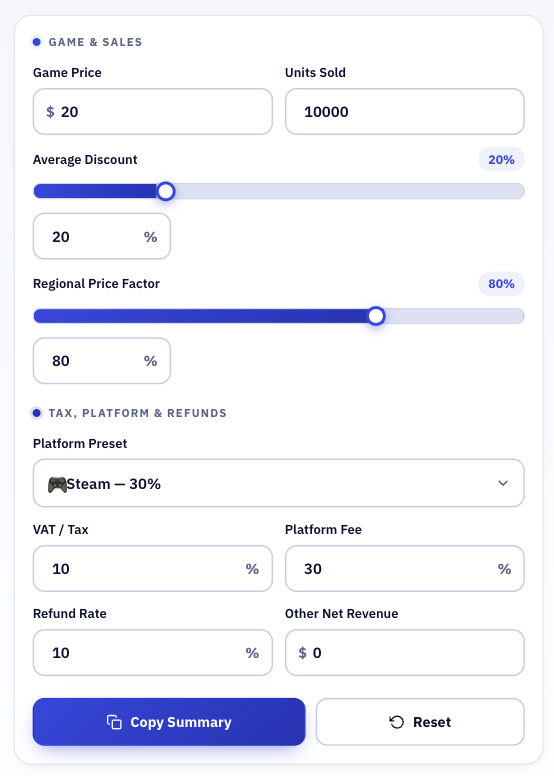
Step 1: Enter Your Game Data
You provide the basic inputs:
- Game Price — the listed price per unit in USD
- Units Sold — total copies sold
- Average Discount — the average discount across all sales
- Regional Price Factor — average selling price across regions as a % of US list price
- VAT / Sales Tax — tax rate applied to sales
- Platform Fee — the store’s commission percentage
- Refund Rate — percentage of sales that get refunded
- Other Net Revenue — optional already-net income from DLC, IAP, or ads
The calculator updates live as you type or move the sliders.
Step 2: Calculate Gross Revenue
First, the calculator finds your gross revenue at full list price.
Gross Revenue = Units Sold × Game Price
Example: 10,000 units × $20 = $200,000
This is the starting point before any deductions.
Step 3: Apply Average Discount
Most games do not sell only at full price. Steam sales, launch discounts, and seasonal promotions reduce the average selling price.
After Discount = Gross Revenue × (1 − Discount Rate)
Example with 20% discount: $200,000 × (1 − 0.20) = $160,000
The calculator subtracts the discount loss from gross revenue.
Step 4: Apply Regional Price Factor
Games are sold globally, and regional pricing means many countries pay less than the US list price. The calculator adjusts for this.
After Regional = After Discount × Regional Factor
Example with 80% regional factor: $160,000 × 0.80 = $128,000
This reflects the lower average selling price across all regions.
Step 5: Deduct VAT / Sales Tax
VAT or sales tax is extracted before the platform takes its cut. This reduces the revenue base that the platform fee is calculated on.
After VAT = After Regional × (1 − VAT Rate)
Example with 10% VAT: $128,000 × (1 − 0.10) = $115,200
Step 6: Deduct Platform Fee
The platform fee is the store’s commission. Steam typically takes 30%, Epic Games Store takes 12% after the first $1,000,000, and consoles usually take 30%.
After Platform Fee = After VAT × (1 − Platform Fee Rate)
Example with 30% platform fee: $115,200 × (1 − 0.30) = $80,640
This is the amount left after the store takes its share.
Step 7: Deduct Refunds
Refunds reverse the sale entirely. The calculator subtracts the refund rate from the remaining revenue.
Net Revenue = After Platform Fee × (1 − Refund Rate)
Example with 10% refund rate: $80,640 × (1 − 0.10) = $72,576
This is your estimated net revenue from game sales.
Step 8: Add Other Net Revenue (Optional)
If you enter Other Net Revenue — such as DLC, in-app purchases, or ad income — the calculator adds it on top.
Total Estimated Revenue = Net Revenue + Other Net Revenue
Example: $72,576 + $0 = $72,576
Step 9: See Final Results
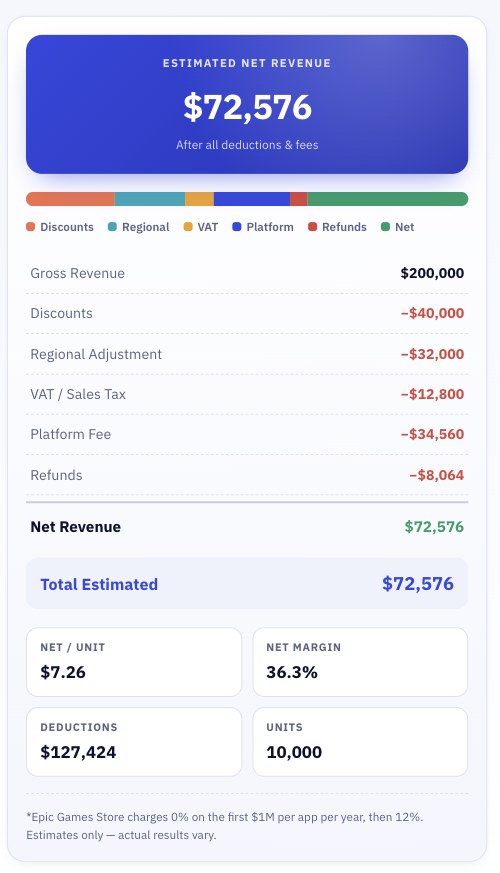
The calculator displays:
- Estimated Net Revenue
- Gross Revenue
- Discount Loss
- Regional Adjustment
- VAT Deduction
- Platform Fee
- Refund Loss
- Net Revenue per Unit
- Net Margin
- Total Deductions
It also shows a colored bar chart so you can see exactly where each dollar goes.
Game Revenue Calculator FAQs
Is this calculator free?
Most Game Revenue Calculators are free online tools with no account required. Users can run unlimited calculations and test different scenarios. The tool is accessible to all developers regardless of experience level.
Can I use it for business planning?
The calculator is useful for financial planning and goal setting. It helps with budgeting, expense projections, and platform comparisons. However, users should combine calculator estimates with actual performance data for business decisions.
Game Revenue Calculator Conclusion
The Game Revenue Calculator estimates game income from sales, DLC, and in-app purchases. It uses price, units sold, and platform fees as inputs. The earnings calculator helps developers understand their revenue potential.
The revenue formula applies discounts, regional pricing, VAT, platform fees, and refunds in sequence. Platform fees and refunds reduce the final amount received. Regional factors and discount strategies cause significant variation in results.
Estimated revenue supports planning, while actual revenue reflects real outcomes. The calculator is a starting point, not a guarantee. Use it to set goals, compare scenarios, and make informed decisions about pricing strategy.
Use the Game Revenue Calculator to estimate your potential revenue. Enter realistic numbers and compare different platforms and pricing scenarios before making business decisions.